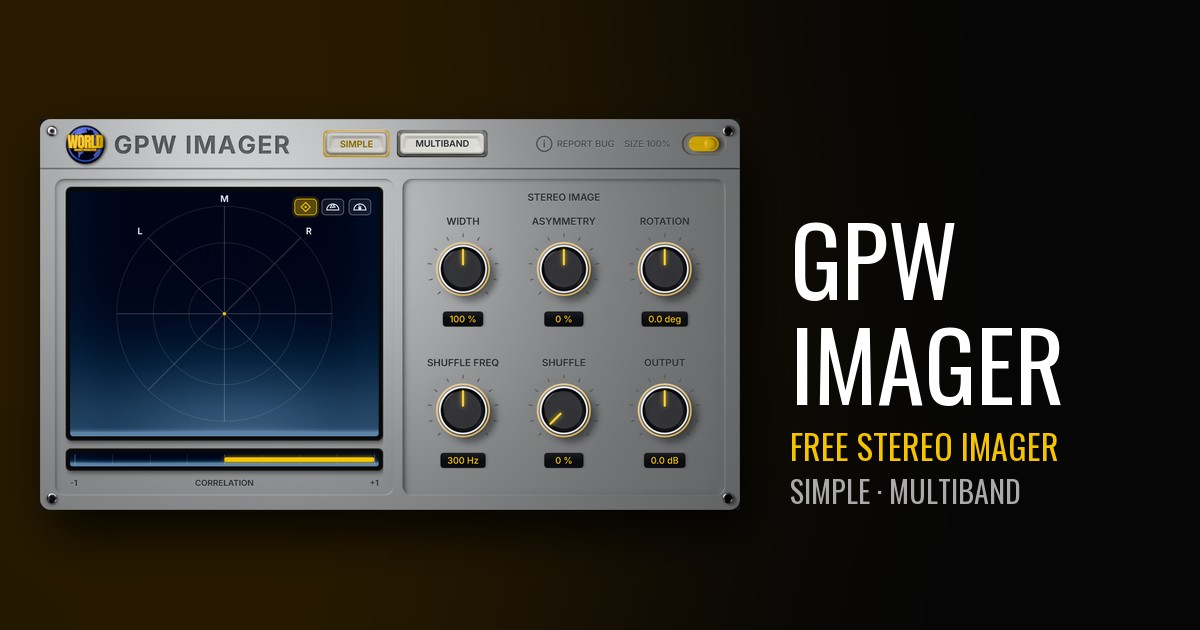
GPW Imager, the second GPW plugin you can download, is out now and it is free. It is a stereo field processor for Windows that lets you widen, narrow and check the stereo image of a sound or a whole mix. It runs as a VST3 in any DAW that hosts VST3 plugins, stereo in and stereo out.
SIMPLE: the whole mix in mid/side
The first tab works on the full signal. Width goes from 0 % (mono) to 200 %, with Asymmetry to lean the image to one side and Rotation up to ±45°. A Blumlein-style shuffler widens the low end below a crossover you set from 40 Hz to 2 kHz, and an Output trim keeps the level where you want it.
MULTIBAND: a different width for each range
The second tab splits the signal into up to four bands, with crossovers you drag anywhere from 20 Hz to 20 kHz, analog or linear-phase. Each band gets its own width, from mono to twice the side, plus bypass and solo. On top of that:
- Stereoize I and II to widen mono sources, and Recover Sides to bring back what narrowing removed.
- Transient/Sustain mode, with separate widths for attacks and tails.
- LEARN, which places the crossovers from your audio.
- Amount, Delta and Mono listen, and input/output gain with meters.
See it before the club hears it
A vectorscope shows the image three ways (Lissajous, polar sample and polar level), and a backlit correlation meter runs from −1 to +1. If it stays on the yellow side, your wide mix still holds up in mono. The SIMPLE tab and analog crossovers add zero latency; linear-phase adds a fixed 128 ms that is reported to your DAW.
Free, and it updates itself
Enter your email on the GPW Imager page and the download starts right away. New versions arrive in one click from the plugin header. While Microsoft's validation of GPW plugins is being completed, Windows may show a "Windows protected your PC" warning: click More info, then Run anyway. A macOS version is coming soon.
GPW Imager joins GPW Heat, the free saturation plugin. The rest of the family is on the GPW Plugins page.