GPW Imager.See your stereo.
A stereo field processor built like rack hardware: width, rotation and a shuffler, with a three-view vectorscope that shows every move the moment you make it.
Rendered, not drawn
Every knob is a photoreal render from Blender, 128 frames per turn. Shift for fine moves, double-click to reset.
Three ways to look
Lissajous goniometer, polar sample and polar level. Anti-phase content folds to the horizon so you spot it at a glance.
Click-free bypass
The illuminated IN switch crossfades to the untouched input, so comparing before and after never pops.
Fits your screen
Resize from 50 to 150 %. Right-click any control for your DAW's automation and controller menu.
GPW ImagerSix knobs. Total control.
A stereo field processor that works in mid/side, so the centre of your mix stays put while the sides open up. Every move shows up on the vectorscope the moment you make it, and the correlation LEDs warn you before width turns into phase trouble.
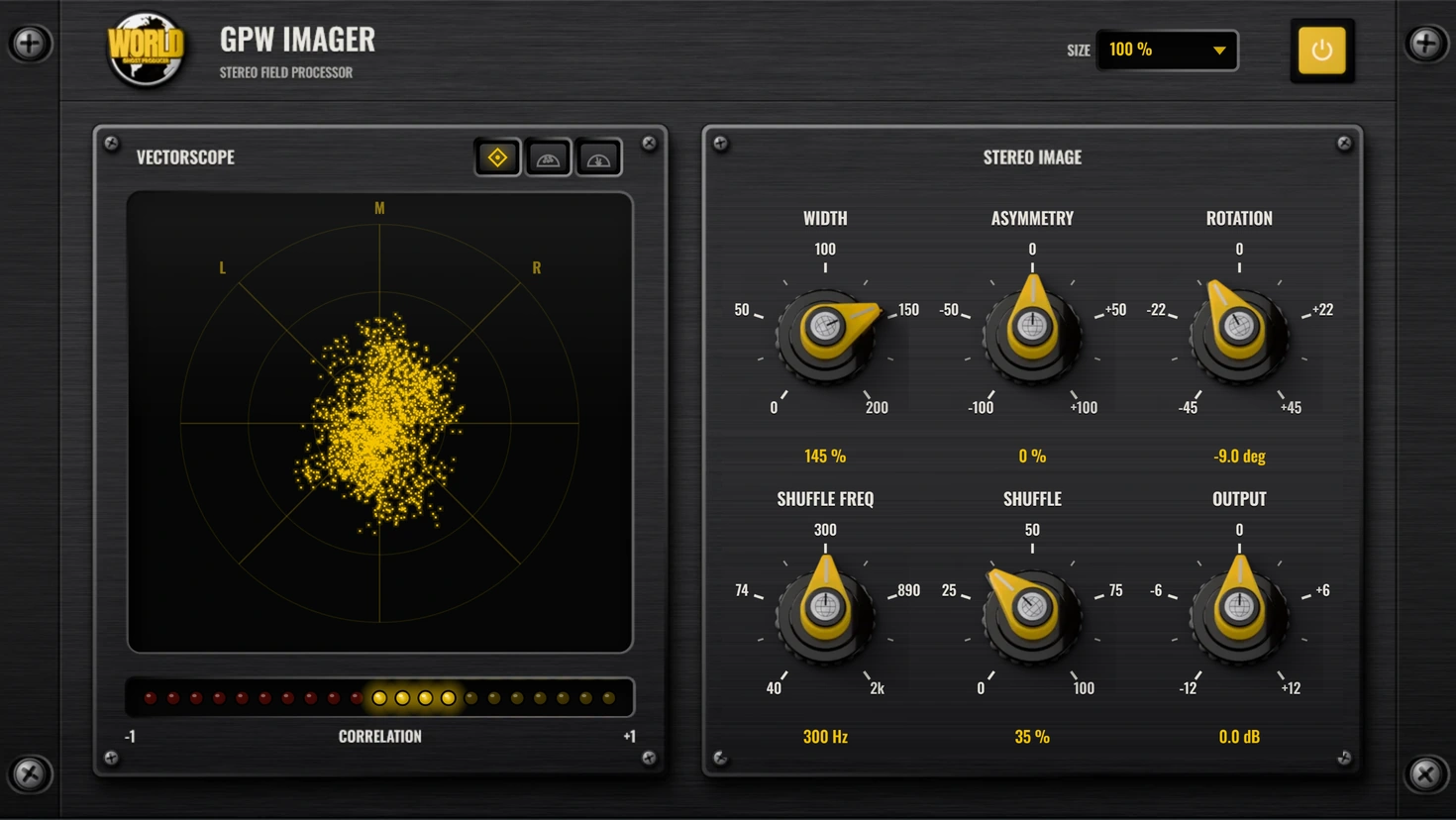
- 0 – 200 %
Width
Scales the side signal. 0% folds the mix to mono, 200% pushes it twice as wide.
- ±100 %
Asymmetry
Bleeds a little of the mid into the side, nudging the centre image left or right.
- ±45°
Rotation
Rotates the whole stereo image in the mid/side plane, like turning the mix on its axis.
- 40 Hz – 2 kHz
Shuffle Freq
Sets the crossover for the shuffler. Everything below it gets the extra width.
- 0 – 100 %
Shuffle
A Blumlein-style shuffler: adds up to +6 dB of side below the crossover for wider lows and low mids.
- ±12 dB
Output
Output trim, so a wider image does not trick you into thinking it is better just because it is louder.
GPW Imager FAQ
Straight answers about what the plugin does and how to use it.
What is GPW Imager?
GPW Imager is a stereo field processor plugin (VST3) made by Ghost Producer World. It works in mid/side: Width scales the side signal from 0 % (mono) to 200 %, Asymmetry shifts the centre image, Rotation turns the stereo image by up to ±45°, a Blumlein-style shuffler adds up to +6 dB of side below a crossover between 40 Hz and 2 kHz, and Output trims the level by ±12 dB.
What does the vectorscope show?
Three views. A Lissajous goniometer with mono on the vertical axis and hard left and right on the diagonals; a polar sample view that places each sample on a half circle by stereo position and level; and a polar level view that draws the energy in each direction as rays. A 21-LED correlation meter runs from −1 (out of phase) to +1 (mono).
How do I check that a wide mix still works in mono?
Watch the correlation LEDs. Yellow LEDs right of centre mean the left and right channels agree; red LEDs left of centre mean they cancel when summed to mono. Lower Width or Shuffle until the meter stays on the yellow side, and use the IN switch to compare with the untouched signal.
Does GPW Imager add latency?
No. It processes sample by sample with no look-ahead, so it reports zero samples of latency to your DAW and is safe on live inputs and buses.
Which plugin format does it use?
VST3, stereo in and stereo out, for any DAW that hosts VST3 plugins. The interface can be resized from 50 to 150 %, and right-clicking a control opens your DAW's automation and controller menu.
When is GPW Imager released?
It is in final testing. Follow Ghost Producer World on Instagram to hear about the release first, or check the plugins page for news.
GPW Imager lands soon.
Free, like every GPW plugin. Leave your email and we will tell you the day it is out.