GPW Duck Shaper.Shape the pump.
Sidechain ducking without the sidechain routing. SIMPLE gives you 16 curves, one big MIX knob and a duck you stretch with the mouse; ADVANCED chains shaper modules with curves you draw. Scroll and feel it pump.
Draw your own pump.
ADVANCED is a rack of shaper modules: Volume, Filter, Pan, Time, Noise and Crush, each with up to three bands and curves you draw. Here the Volume module is live: draw on the curve, load shapes from the library, split it into bands.
The pump
Ducks, gates and swells from any curve you draw, with a trim after it. Each of up to three bands runs its own curve and mix.
Twelve filter types
Low-pass, high-pass, band-pass, notch and peak, 6 to 24 dB. Curves drive the cutoff and the resonance, with drive and a stereo offset.
Movement
Auto-pan from a curve, with four pan laws, width and a Haas spread that swirls the image.
Tape tricks
A curve scrubs through a buffer: half-time, tape stops and frozen steps, from 2.5 ms up to four bars.
Air that pumps
White, pink, brown, hiss, crackle or tonal noise, with curves for its level and pitch, and its own high- and low-pass.
Bits and rate
Curves for bit depth and sample rate, with push, dither, jitter, a pre-filter and a treble control.
Follows the loudness
The input or the sidechain can push any curve up or down, with attack, release and sensitivity per module.
See the output
An oscilloscope draws the output over one cycle of the edited curve, so you see exactly where it ducks.
Rendered, not drawn
The big MIX knob and every small one are photoreal renders from Blender, 128 frames per turn. Shift for fine moves, double-click to reset.
Tempo, MIDI or audio
Lock to the host tempo, retrigger from MIDI notes, or let a kick on the sidechain input fire the duck, with threshold and focus.
27 to start from
Factory presets for pumps, gates, filters, motion, time, noise and envelopes, plus your own saved from the header.
Updates in one click
The plugin tells you when a new version is out and updates itself. Resize from 50 to 150 %; right-click any control for automation.
The SIMPLE tabOne knob. Sixteen curves.
SIMPLE is the fast lane: pick a curve, set its length, choose what fires it and turn MIX. The screen shows the curve over what comes in and what goes out, so you see the duck the moment you hear it.
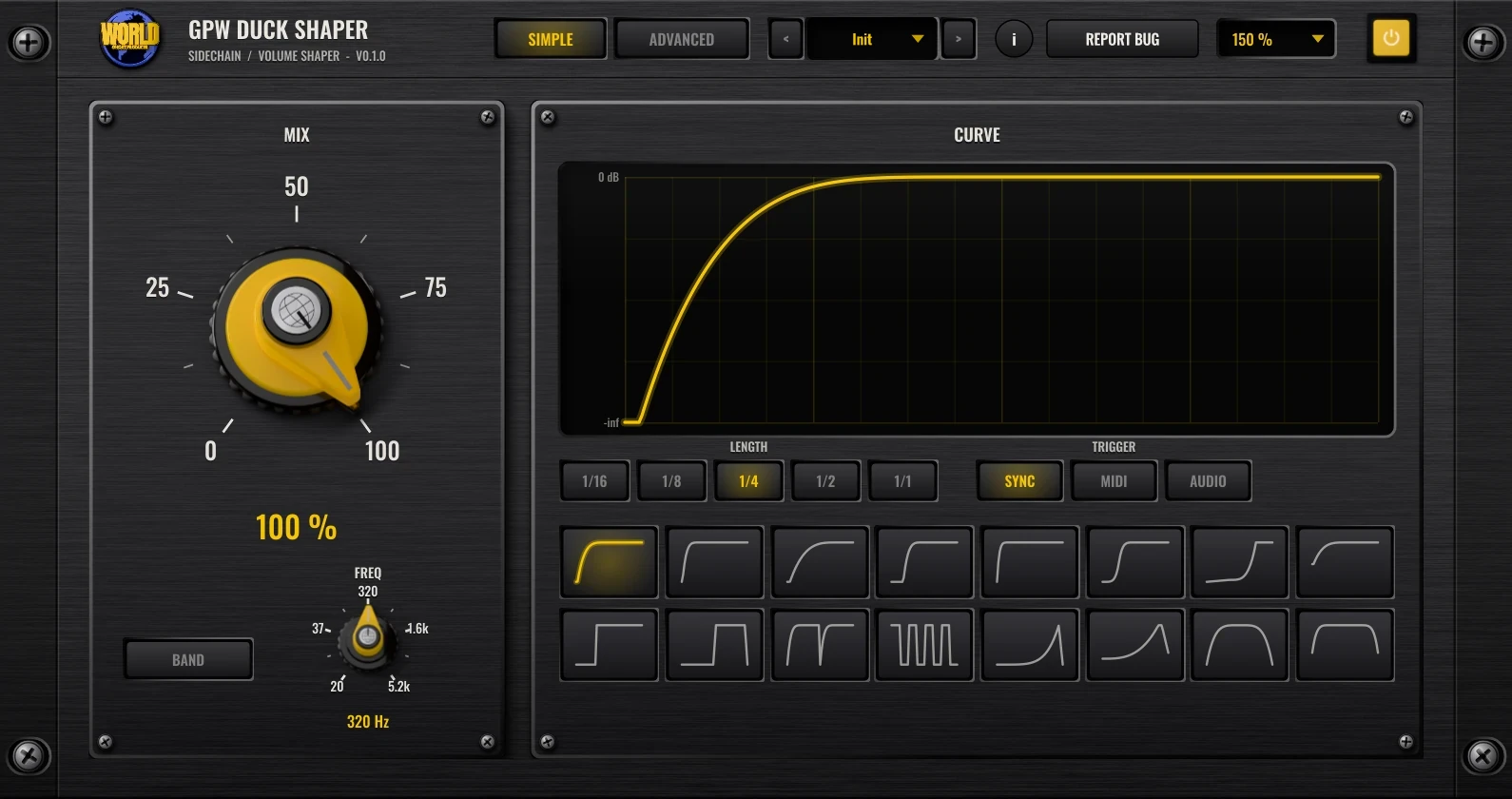
- 0 – 100 %
Mix
How deep the duck goes. 0 % leaves the sound alone, 100 % follows the curve all the way down.
- 16 curves
Curve
Sixteen built-in shapes: eight pumps, four cuts and four swells. Click one and it plays right away.
- 25 – 400 %
Duck length
Drag the curve on the screen: left makes the duck shorter, right makes it longer. Double-click puts it back.
- 1/16 – 1/1
Length
How long one curve lasts: a sixteenth, an eighth, a quarter, a half or a whole bar.
- Sync · MIDI · Audio
Trigger
SYNC follows the host tempo, MIDI restarts the curve on every note, AUDIO fires it from the kick on the sidechain (or the track itself).
- 20 Hz – 5.2 kHz
Band & Freq
With BAND on, only the part below FREQ is ducked: the bass makes room for the kick while the highs stay put.
GPW Duck Shaper FAQ
Straight answers about what the plugin does and how to use it.
What is GPW Duck Shaper?
GPW Duck Shaper is a free sidechain and volume shaper plugin (VST3, Windows) made by Ghost Producer World. It ducks your sound along a curve instead of a compressor, so the pump is the same on every beat. SIMPLE has 16 curves, a big MIX knob, length, trigger and a low-band mode; ADVANCED chains Volume, Filter, Pan, Time, Noise and Crush modules with curves you draw.
How is it different from sidechain compression?
A compressor reacts to the level of the kick, so the duck changes with the mix and needs a sidechain routing. Duck Shaper plays a curve: the depth and the shape are exactly what you see on the screen, locked to the tempo, with no routing needed. If you want it to follow a real kick, switch the trigger to AUDIO and feed the kick to the sidechain input.
What can trigger the duck?
SYNC runs the curve on the host tempo. MIDI restarts it on every note you send to the plugin. AUDIO fires it from hits on the sidechain input (or on the track itself when nothing is routed), with a threshold and, in ADVANCED, a focus frequency. ADVANCED adds HZ, a free-running rate from 0.01 to 40 Hz, and swing for the synced curves.
What does the ADVANCED tab add?
A chain of six shaper modules: Volume, Filter, Pan, Time, Noise and Crush. Each module can split into three bands, and every band runs its own curve per target, picked from a palette of ten that you draw on, with a library of 35 shapes, smoothing, lengths from 1/32 to 16 bars, an envelope follower and a scope.
Does GPW Duck Shaper add latency?
No. Both tabs run with zero latency, so it can sit on any channel or bus without shifting anything in time.
Which plugin format does it use, and how do updates work?
VST3 for Windows, stereo in and out plus a stereo sidechain input, in any DAW that hosts VST3 plugins. It comes with 27 factory presets and saves your own. The plugin checks for new versions and updates in one click from its header; the interface resizes from 50 to 150 %, and right-clicking a control opens your DAW's automation menu.
Is GPW Duck Shaper free?
Yes. Every GPW plugin is free. GPW Duck Shaper is coming soon; leave your email on this page and we will tell you the day it is out.
GPW Duck Shaper lands soon.
Free, like every GPW plugin. Leave your email and we will tell you the day it is out.